
Empty Canvas Element
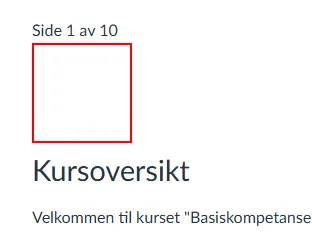
Install this script hereWhile this script is active, it will look for empty HTML-elements on Canvas pages. If it finds an empty element, it will be styled with a red, square border, as shown on the screenshot below.
Note that some element are intentionally intended to be empty. This may be div-elements that are used for dividers, or elements that have yet to have some content. Having this script turned on will not affect the actual page content for others, and turning it off and reloading the page will no longer show the empty elements (beyond any styling said elements have on their own).